Welcome to our website. Neque porro quisquam est qui dolorem ipsum dolor.

Lorem ipsum eu usu assum liberavisse, ut munere praesent complectitur mea. Sit an option maiorum principes. Ne per probo magna idque, est veniam exerci appareat no. Sit at amet propriae intellegebat, natum iusto forensibus duo ut. Pro hinc aperiri fabulas ut, probo tractatos euripidis an vis, ignota oblique.

Ad ius munere soluta deterruisset, quot veri id vim, te vel bonorum ornatus persequeris. Maecenas ornare tortor. Donec sed tellus eget sapien fringilla nonummy. Mauris a ante. Suspendisse quam sem, consequat at, commodo vitae, feugiat in, nunc. Morbi imperdiet augue quis tellus.

Senin, 27 Agustus 2012

Brother Service Manual Model MFC9600-MFC9850-MFC9870-DCP1200-MFC9750

Brother Service Manual Model MFC9600-MFC9850-MFC9870-DCP1200-MFC9750, covering the specifications, construction, theory of operation, and maintenance of the Brother machine. It includes information required for field troubleshooting and repair–disassembly, reassembly, and lubrication–so that service personnel will be able to understand machine function, to rapidly repair the machine and order any necessary spare parts.

To perform appropriate maintenance so that the machine is always in best condition for the customer, the service personnel must adequately understand and apply this manual.


This manual is made up of six chapters and appendices.
CHAPTER I.     GENERAL DESCRIPTION
CHAPTER II.   INSTALLATION
CHAPTER III. THEORY OF OPERATION
CHAPTER IV.  DISASSEMBLY/REASSEMBLY AND LUBRICATION
CHAPTER V.    MAINTENANCE MODE
CHAPTER VI.  ERROR INDICATION AND TROUBLESHOOTING
Appendix 1. EEPROM Customizing Codes
Appendix 2. Circuit Diagrams

This manual describes the models and their versions to be destined for major countries. The specifications and functions are subject to change depending upon each destination.

SAFETY INFORMATION

Laser Safety (110-120V Model only)
This printer is certified as a Class 1 laser product under the US Department of Health and Human Services (DHHS) Radiation Performance Standard according to the Radiation Control for Health and Safety Act of 1968. This means that the printer does not produce hazardous laser radiation. Since radiation emitted inside the printer is completely confined within the protective housings and external covers, the laser beam cannot escape from the machine during any phase of user operation.
CDRH Regulations (110-120V Model only)

The Center for Device and Radiological Health (CDRH) of the US Food and Drug Administration implemented regulations for laser products on August 2, 1976. These regulations apply to laser products manufactured from August 1, 1976. Compliance is mandatory for products marketed in the United States. The label shown below indicates compliance with the CDRH regulations and must be attached to laser products marketed in the United States.

Machine Outline :

1. External Appearance and Weight, The figure below shows the machine appearance and approximate dimensions.


Machine outline External Appearance and Weight Brother MFC9600

2. Components, The machine consists of the following major components:

Machine outline Brother MFC9600

Control Panel Model MFC9600-MFC9850-MFC9870-DCP1200-MFC9750 :

Control Panel Brother MFC9600 Series
You can get FREE DOWNLOAD the Brother Service Manual Model MFC9600-MFC9850-MFC9870-DCP1200-MFC9750

Minggu, 26 Agustus 2012

Kyocera FS 9100 Manual Reference Guide

Kyocera FS 9100 service manualThis Kyocera fs 9100 manual publis on September 2001, revision 2.1 with 200 pages english language. Like the other, this ebook describe how to instalation, maintenance, service etc.
Contents for this ebook :
1. Specification, you can see the brocure
2. Handling precautions, Drum
Note the following when handling or storing the drum.
• When removing the image formation unit, never expose the drum surface to strong direct light.
• Keep the drum at an ambient temperature between –20 °C/–4 °F and 40 °C/104 °F and at a relative humidity not higher than 85% RH. Avoid abrupt changes in temperature and humidity.
• Avoid exposure to any substance which is harmful to or may affect the quality of the drum.
• Do not touch the drum surface with any object. Should it be touched by hands or stained with oil, clean it.
3. Instalation, be careful with instal this machine, better do by technician
4. Service and maintenance mode. Service mode, The printer is equipped with the service mode that can be accessed in the manu system. The service mode is intended for use by the service person for maintenance and service for the items explained in the following sections. Maintenance mode, The printer is equipped with a maintenance function which can be used to maintain and service the machine. To run the maintenance mode, Insert a compact flash card to which the API program has been written into the printer and load the API program to the printer using either method.
* Turn off and on the printer. The API program will be automatically loaded into the printer.
* Load the API program with read program.
* Enter the MENU mode and display the [>>Read Program Maintenance API] in the [Memory Card>], then press the ENTER key.
The maintenance mode can be executed from the MENU mode.
If the compact flash card is removed from the printer and then the printer is turned off and on, the API program will be
deleted from the printer and the maintenance mode will be deleted from the MENU mode.
5. Troubleshooting
6. Assembly and disassembly
7. Downloading printer firmware for upgrade
8. Mechanical construction
9. Electrical parts layout
10. Operation of the PWBs
Don’t forget read the Safety precautions, before you service or maintenance. Than you can get this manual free by download here

Sabtu, 25 Agustus 2012

Work in Pregnancy


THE pregnancy is the happiest moment in a woman's life. But for many women who have a career before, pregnancy does not mean stop any work he does.

Especially now, pregnant women, and work in many offices who decided to take time off before the birth of the baby. Even so, the mother is also of course be required to consider the condition of the body.

Here are some things to keep in mind while undergoing a pregnancy in order to stay on the move with the maximum, as reported by Boldsky.

Avoiding stairs

Rung course can make you tired. Not only that, pregnant women should avoid working the steps because it can cause pressure on the placenta. If your doctor has advised you to avoid stairs, make sure you follow it. If by chance you're climbing stairs, avoid carrying heavy items. Hold the handle and gently clinging. Wear shoes without the right to avoid slipping when walking up them.

Eating healthy food

Certain food cravings are common for pregnant women. However, for women who work are advised to carry some healthy snacks for the office. Consider the interval of time consuming food. We recommend that you do not overdo it because it can affect the fetus in your stomach.

Say no to caffeine or cigarettes

According to numerous studies, consumption of caffeine can cause miscarriage, especially in the first trimester. Caffeine is an addictive substance that has a stimulant which can be harmful to the growing baby.

Similarly with cigarettes. Because the cigarette contains nicotine that can harm fetal growth and development. When you smoke, your baby will experience a shortage of oxygen and the impact on growth. In addition, smoking is also associated with premature birth, miscarriage, and birth defects.

Notice how you sit

At the office, you also need to consider how to sit for a pregnant woman. Sit up straight in a chair. You can put a backrest cushion to ease aching backs. If you feel uncomfortable and nauseous, take a deep breath and eat something.

Break

For pregnant women who work have to pay attention to their break time. You could do with a short stroll to breathe fresh air and drink plenty of water. Rest can also be useful to control the feelings that can make you not satisfied with the affairs of the work you are doing

Source : http://whenareyoumostfertilee.com/career-woman-pregnant/

Jumat, 24 Agustus 2012

Cara Menyembunyikan IP Address Dengan Mudah

Cara Menyembunyikan IP Address Dengan Mudah-Menyembunyikan IP Address Dengan Mudah biasa di lakukakan oleh beberapa seseorang di karenakan dengan berbagi alasan salah satunya adalah tentang hal Privasi dimana agar menghindari pelacakan jika kita melakukan tindakan yang "tidak senonoh yg seharusnya gak kita lakukan "hacking".Nah Pada Kesempatan ini ruang sharing akan berbagi tips bagaimana Cara Menyembunyikan IP Address Dengan Mudah, berikut ini cara
Cara Menyembunyikan IP Address Dengan Mudah:

Kunjungi situs penyedia proxy seperti : http://freeproxy.com, http://samair.ru/proxy, dll
Terus carilah proxy Negara mana yang mau di pakai , ingat proxy harus yang Anonymous

Selanjutnya untuk mensetting di PC kita :
Untuk pemakai Internet Explorer

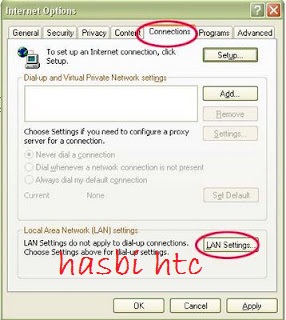
  1. Buka Tools Internet Option
  2. Klik tab Connection -> klik LAN settings

Cara Menyembunyikan IP Address Dengan Mudah

Menyembunyikan IP Address Dengan Mudah


  1. Pada bagian proxy server, isi centang pada "Use a proxy for your LAN.."
  2. Pada box address masukan IP proxy, pada box port masukan portnya
  3. Centang juga bagian “by pass..”
  4. Klik Ok

Untuk pemakai Mozilla Firefox

  1. Buka tools options
  2. Bagian advance, klik tab Network

Cara Menyembunyikan IP Address Dengan Mudah


Cara Menyembunyikan IP Address Dengan Mudah

  1. Bagian Connection, klik Setting di sebelah kanan
  2. Kemudian pilih manual proxy configurations
  3. Pada bagian HTTP proxy, masukkan IP proxy dan portnya
  4. klik OK

Itulah Cara Menyembunyikan IP Address dengan Mudah yang bisa ruang sharing share kali selamat mencoba dan semoga bermanfaat buat anda
Happy blogging Lihat sumbernya SINI

Sabtu, 28 Juli 2012

Tingkatkan Pelanggan Blog Daftarkan Feed Blog Ke RSS Directories

Daftarkan Feed Blog Ke RSS Directories Memiliki blog dan Just Share for you ataupun pengalaman tentunya dipersembahkan bagi pembaca atau pengunjung blog. Tanpa pembaca blog yang loyal dan respon mereka, tentunya blog tidak akan berkembang ke bentuk apapun. Traffic blog atau pageview blog pun akan susah meningkat, Pengunjung loyal biasanya tidak datang dari search engine, melainkan mereka yang datang melalui feed subscription, follow, social media, direktori blog maupun social bookmark. Dari beberapa cara tersebut, yg paling memberikan kontribusi cukup baik adalah feed subscription melalui RSS feed. Karena pembaca akan langsung mendapatkan notifikasi dari email atau dari feed direktori dimana mereka berlangganan. Promosi blog serta konten blog pun akan jauh lebih lengkap apabila kita menggunakan RSS directories. sebab, untuk menambah pelanggan feed, menggunakan direktori feed sebagai agregator dan promotor blog adalah hal yang sangat penting.


Feed Blog Ke RSS Directories image 1


Tingkatkan Pelanggan Blog Daftarkan Feed Blog Ke RSS Directories

Feed Blog Ke RSS Directories


Berikut ini adalah 30+ feed directories ternama yg sudah saya pilihkan untuk sobat semua. Sebelum mendaftarkan, seperti halnya mendaftarkan blog di direktori blog, persiapkan terlebih dahulu data-data seperti:
  1. URL feed blog, biasanya untuk blogger/blogspot diakhiri dengan /feeds/posts/default (atom), contoh: http://hasbihtc.blogspot.com/feeds/posts/default, atau bisa juga digunakan url feed yang telah diconvert ke feedburner (contoh: http://feeds.feedburner.com/blogspot/hasbihtc),
  2. Nama Blog
  3. Deskripsi blog (jika diperlukan disyaratkan)
  4. Tag (jika diperlukan)
  5. Url Blog (jika diperlukan disyaratkan)
  6. Alamat email ((jika diperlukan/disyaratkan, untuk konfirmasi pendaftaran)
  7. Nama akun (jika diperlukan disyaratkan)


Feed Blog Ke RSS Directories image 2


Tingkatkan Pelanggan Blog Daftarkan Feed Blog Ke RSS Directories


Guna memudahkan pendaftaran, cari link-link untuk menuju form pendaftaran yg biasanya dituliskan seperti ini: "Submit Feed", "Suggest Feed", "Add a Feed", "Submit Blog", "Suggest Blog", "Add Blog", dll. Sebagian besar dari direktori RSS feed di bawah membutuhkan pendaftaran akun, sebagian kecil lainnya dapat langsung mendaftarkan URL feed, inilah daftar direktori RSS feed-nya:
  1. Plazoo.com
  2. blogbal.com
  3. RSSmicro.com
  4. RSSMountain.com
  5. www.feedage.com
  6. www.feedcat.net
  7. www.feedlisting.com
  8. findrss.net
  9. www.rssmotron.com
  10. ReadABlog.com
  11. GoldenFeed.com
  12. BlogDigger.com
  13. WeBlogAlot.com
  14. chordata.info
  15. BlogPulse.com
  16. IceRocket.com
  17. RSS-Network.com
  18. feeds2read.net
  19. www.feedplex.com
  20. www.syndic8.com
  21. www.wingee.com
  22. www.yodpod.com
  23. www.newsisfree.com
  24. www.newzalert.com
  25. www.rssbuffet.com
  26. www.rsstop10.com
  27. www.redtram.com
  28. www.oobdoo.com
  29. www.topix.net
  30. www.5z5.com
  31. www.feedmailer.net

Feed Blog Ke RSS Directories image 3

Tingkatkan Pelanggan Blog Daftarkan Feed Blog Ke RSS Directories


Beberapa direktori rss feed bahkan memiliki SEO dan terindeks search engine dengan baik serta mengarah langsung ke link blog sehingga menambah visibilitas blog di search engine. So daftarkan segera blog anda di direktori feed di atas!
Tingkatkan Pelanggan Blog Daftarkan Feed Blog Ke RSS Directories Good luck and have a nice Blogging bukarahsia.blog

6 Negara ditinjau Budaya Sexnya

6 Negara ditinjau Budaya Sexnya Orang Italia, Polandia, china, Brazil, dan Yunani memiliki pendapat seks harus dilakukan setiap hari. Sebuah polling menemukan bahwa orang Italia, china dan Polandia dengan usia 60 tahun, melakukan hubungan seks secara teratur, Semua orang telah mengetahui jika negara ini memiliki tradisi seks Tidak jelas mengenai range waktu nya, namun yang jelas frekwensi aktifitas seks mereka memasukan Italia dalam daftar ini Negara ditinjau Budaya Sexnya


6. Negara ditinjau Budaya Sexnya - Italy

6 Negara ditinjau Budaya Sexnya

Negara ditinjau Budaya Sexnya


Orang Italia memiliki pendapat seks harus dilakukan setiap hari. Sebuah polling menemukan bahwa 32% orang Italia dengan usia 60 tahun, melakukan hubungan seks secara teratur. Tidak jelas mengenai range waktu nya, namun yang jelas frekwensi aktifitas seks mereka memasukan Italia dalam daftar ini.

5. Negara ditinjau Budaya Sexnya - Polandia

6 Negara ditinjau Budaya Sexnya


Budaya seks Polandia cukup konservatif, namun Polandia memiliki festival tahunan dengan nama Eroticon yang menampilkan produk-produk terbaru perlengkapan seks. Skandal politisi Polandia pernah terjadi namun yang jelas poin terbesar Polandia masuk daftar ini adalah dengan dipegangnya “rekor Gangbang dunia” yang diraih oleh 2 orang asal negara ini dan dilakukan di Polandia sendiri.


4. Negara ditinjau Budaya Sexnya - China

6 Negara ditinjau Budaya Sexnya


Semakin berevolusi budaya China, menyebabkan semakin berevolusi nya kegiatan seksual di negara ini. Ingin bukti? Hanya dalam tempo 8 tahun, 5000 toko penyedia perlengkapan dan kebutuhanseks telah berdiri dan hanya berdiri di satu kota yaitu Beijing ditambah China memiliki SEXPO, dimana warga China datang untuk memeriksa perlengkapan seksnya.
70% produk seks dunia adalah buatan China, Untuk hal-hal yang telah disebutkan maka China masuk daftar.

3. Negara ditinjau Budaya Sexnya - Russia

6 Negara ditinjau Budaya Sexnya


Perang Dingin pada masanya menyembunyikan kehidupan seks penduduk Rusia, dan setelah tumbangnya komunisme maka hal ini terkuak lebar. Libido orang Rusia membuat klub dan bar berkembang sangat pesat di Moskow dimana hookups merupakan hiburan malam di negarayang ber-horny tinggi ini.

2. Negara ditinjau Budaya Sexnya - Brazil

6 Negara ditinjau Budaya Sexnya


Merupakan tanah kelahiran dari “thong”, masuk akal jika seks adalah sama pentingnya dengan bernapas di negara yang satu ini. Pantainya selalu dipenuhi wanita-wanita cantik disamping Brasil memiliki Karnaval tahunan dan membuat Brasil masuk dalam daftar.
Menurut The Penguin Atlas of Human Sexual Behaviour, durasi seks terpanjang dipegang oleh Brasil, di mana penduduknya rata-rata berhubungan intim selama 30 menit.

1. Negara ditinjau Budaya Sexnya - Yunani

6 Negara ditinjau Budaya Sexnya


Semua orang telah mengetahui jika negara ini memiliki tradisi seks dari jaman kuno. Dengan iklim Mediterania dan memiliki banyak pulau – pantai, menjadikan Yunani nomer 1 Negara
Sekian ulasan dari saya mengenai Negara ditinjau Budaya Sexnya Semoga dapat bermanfaat.
Dirangkum dari berbagai sumber

Kamis, 26 Juli 2012

Efek Bahaya Game Online Untuk Anak-anak

Efek Bahaya Game Online Untuk Anak-anak Suka bermain game online? Peringatan banyak bermain game online dapat menyebabkan kelaparan, kecanduan, dan efek negatif turunannya,menurut guru besar ilmu pediatri Fakultas Kedokteran Universitas Gadjah Mada Prof. Dr. Mohammad Juffrie, SpAK, Phd sebagaimana belajar online gratis kutip dari tempo.co "Sebuah game, biasanya di set-up sedemikian rupa sehingga orang dipaksa terus-menerus memainkannya. Ini karena game memiliki level-level yang semakin meningkat dengan lawan atau pasangan serentak di berbagai tempat (multiplayer online games). Permainan seperti ini lazimnya menyajikan kisah di dunya maya yang tak pernah terselesaikan, sehingga menumbuhkan penasaran".

Efek Bahaya Game Online

Efek Bahaya Game Online


Kecanduan game online sangat membahayakan kesehatan,Akibat duduk berlama-lama di depan monitor akhirnya lupa memperdulikan makan, sehingga tubuh dipaksa berfikir tanpa tambahan asupan gizi. Lebih lanjut Dr. Juffrie mengatakan ketika seseorang tidak makan, sementara energi tetap terus dikeluarkan karena berfikir, maka kadar gula darah dalam tubuh akan turun. Ketika keadaan ini berkelanjutan, maka tubuh akan mengkompansasi kondisi tersebut dengan mengambil cadangan energi dari lemak serta protein.
Akibat lebih parahnya apabila keadaan ini berlangsung terus-menerus maka jumlah asam laktat dalam tubuh akan meningkat, sehingga terganggulah sistem tubuh seperti otak dan jantung.
Berlama-lama di depan komputer juga beresiko kena efek ultraviolet tinggi, sehingga anak-anak yang kecanduan akan cepat rusak matanya dan tidak normal.
Dalam sebuah penelitian, bermain game bisa memicu meningkatnya zap dopamine pada otak. Sebuah studi di Hammersmith Hospital di London, Inggris menunjukkan, bahwa peningkatan kadar dopamine sama dengan meningkatnya kadar amphetamine, atau menyebabkan pemain kecanduan game online. Hal inilah yang menyebabkan online gamer betah berlama-lama bermain game.
Apabila anak sudah kecanduan game online maka harus masuk rehabilitasi untuk pecandu game. Sayang rehabilitasi khusus untuk kecanduan game online belum ada di Indonesia.

Akibatnya akan terlihat sepeti beda, sebenernya bukan game online sepenuhnya yang ane maksud sebagai pemicu perubahan dalam perkembangan anak, tapi gaya bergaulnya yang pasti bebeda. selain itu jga efeknya dapat bebpengaruh terhadap pelajaran. contohnya :

Anak kebanyakannya kalau sering di biajarkan bermain game terlalu bebas. bisa jadi yang ada di otaknya hanya memikikan tentang game dan game. sehingga pelajaran akan terbengkalai.
Cara berucap juga akan sedikit kasar, akibat pengaruh pergaulan yang tidak sehat tadi.
Nah yang ini perlu di perhatikan juga. yah apalagi kalau bukan yang namanya duit yang jadi masalah. sudah pasti uang jajan juga akan minta tambah dan pasti akan kebuang sia-sia. dan menyita waktu berjam-jam yang seharusnya buat belajar. dan bisa di tabungin, hitunglah mulai dari sekarang sudah beapakah uang yang anak anda keluarkan yang di hambur-hamburka anak anda. yah kira-kira sudah bisa kebeli motor atau mobil mewah kali yah.

Efek Bahaya Game Online Untuk Anak-anak semoga dapat bermanfaat.

9 Fun and Useful Plugins for your Google Chrome

Here are some of very useful plugins to make Google Chrome more fun to use.

Google Translate
This extension adds a button to your browser toolbar. Click the translate icon whenever you want to translate the page you're visiting. The extension also automatically detects if the language of a page you're on is different from the language you're using for your Google Chrome interface. If it is, a banner appears at the top of the page. Click the Translate button in the banner to have all the text on the page appear in the new language.

Mini Google Maps
Google maps in a click away.Mini Google Maps comes in handy when you're looking for browsing on a map but want to find it quickly and get the job done.

Pendule
This extension is very useful for Web Designer and Developer, It has all the features like disable CSS, Show password, Color picker, Validator and so on. try for yourself, I’m using it and I like it so far. Try also the Web Developer plugin.

Awesome Screenshot
Capture the whole page or any portion, annotate it with rectangles, circles, arrows, lines and text, blur sensitive info, one-click upload to share. Support PNG and shortcuts.

Lazarus : Form Recovery
Lazarus saves everything you type so if the worst happens you can recover the whole form by simply clicking a menu item. The data can be encrypted and is saved on your machine so you know it's safe. 

Lorem Ipsum Generator
Chrome Extension that generates random "Lorem Ipsum" text. It uses a minimalist and well looking design. Many other extensions of this type - in other browsers - simply complicate this task, using really extensive code, XHR, etc. The main purpose of this one, is to use the less amount of code (and also memory) and help the developer/user to get the job done.

Firebug Lite
Firebug Lite is not a substitute for Firebug, or Chrome Developer Tools. It is a tool to be used in conjunction with these tools. Firebug Lite provides the rich visual representation we are used to see in Firebug when it comes to HTML elements, DOM elements, and Box Model shading. It provides also some cool features like inspecting HTML elemements with your mouse, and live editing CSS properties.

Shoutcast
Tired of work? , why don’t you relax a bit?  Listen to a music with this Chrome extension,  It gives you access to different Internet radios around the world.and it’s free that’s the good thing about it. The SHOUTcast Radio Chrome Extension allows you to explore SHOUTcast stations, search by key word or browse across 20+ popular music genres.

Google Dictionary
Want to know the meaning of that word? Just double click it using this plugin and it will give you the meaning of it, One good features of it is that it supports different languages.

How to Make Ubuntu Look Like Mac OSX


Do you like OSX GUI but don't feel giving up your Linux? then try a script called Macbuntu, an easy to use Mac OSX transformation pack dedicated to Ubuntu. Macbuntu will install all the necessary apps, icon and other resources to make your ubuntu desktop look just like OSX.

How to install Macbuntu 10.04 v2.3  Lucid Lynx
Open a terminal and type the following commands:
$ wget https://downloads.sourceforge.net/project/macbuntu/macbuntu-10.04/v2.3/Macbuntu-10.04.tar.gz -O /tmp/Macbuntu-10.04.tar.gz $ tar xzvf /tmp/Macbuntu-10.04.tar.gz -C /tmp $ cd /tmp/Macbuntu-10.04/ $ ./install.sh

How to install Macbuntu 10.10 v2.3  Maverick Meerkat
Open a terminal and type the following commands:
$ wget https://downloads.sourceforge.net/project/macbuntu/macbuntu-10.10/v2.3/Macbuntu-10.10.tar.gz -O /tmp/Macbuntu-10.10.tar.gz $ tar xzvf /tmp/Macbuntu-10.10.tar.gz -C /tmp $ cd /tmp/Macbuntu-10.10/ $ ./install.sh
After Macbuntu finishes setting everything up, restart your computer and enjoy your new MacOSX-looking Ubuntu. And if you ever decided that you want to go back to regular Gnome Desktop, Macbuntu comes with an uninstall script.


How to remove Macbuntu 10.04 v2.3 Lucid Lynx
Open a terminal and type the following commands:
$ cd ~/.macbuntu/10.04-2.3/
$ ./uninstall.sh
How to remove Macbuntu 10.10 v2.3 Maverick Meerkat
Open a terminal and type the following commands:
$ cd ~/.macbuntu/10.10-2.3/
$ ./uninstall.sh 

Brother Printer Error Codes and Solutions


These are list of brother printer error codes, cause and possible solutions for Brother Inkjet Printer DCP and MFC Series. These error codes mean machine problems. In many cases, the machine will require service.

Please refer to the following table to check the error code displayed on the LCD.
Error Code Cause Solution
30,31,32,33,34,35,36
37,38,39,3C,3F
The machine does not work due to a paper jam. Clear the paper jam
40,42,43,44 The internal temperature is too high. Unplug the machine from the AC outlet and if possible cool the room where the machine is located.
46 The ink absorber pad is full and needs replacing. Replace Waste Ink Absorber pad then perform this procedure for DCP Model or MFC Model
48 There is a problem on the print head, Please contact Brother Customer Service.
49 The internal temperature is too low. Unplug the machine from the AC outlet and if possible warm the room where the machine is located.
4F There is a problem on the print head. Please contact Brother Customer Service
50,51,52,57,5A,5B,5C,5D
5E,6C,6F,70,71,72,73,7A
7D
The machine does not work due to a paper jam or some sensor problem. Clear the paper jam. If the problem still continues after clearing the paper jam, try to clean the encoder strip behind the printer head
8F There is a problem on the paper feed motor. Replace paper feed motor
A5,A6,A7,A8,AF There is a problem on the scanner. Please contact Brother Customer Service
E2,E3 There is a problem on the main PCB. Replace PCB Mainboard